En la publicación electrónica MCData.ti se puede encontrar una clasificación bastante completa de diferentes herramientas relacionadas con el business intelligence y la gestión de datos.
Esta es la descripción que se realiza de las herramientas de reporting y análisis de datos.
Empresa: Altitude Software
Producto: uCI 2000 Plus
Descripción: Suite de soluciones analíticas que permite gestionar las interacciones con los clientes de un modo personalizado. Así, el agente puede comunicarse con el cliente a través del teléfono, el correo electrónico, la web o mediante canales tradicionales como el punto de venta o el fax.
Empresa: Bertelsmann Direct
Producto: BD Mercury
Descripción: Solución orientada a aquellas empresas que necesitan gestionar ficheros de clientes con objetivos comerciales y de marketing. Opera sobre una base de datos, principalmente de clientes, y es capaz de elaborar filtros para definir los detalles de la selección.
Producto: BD Geocode
Descripción: Sistema integrado para la normalización y geocodificación de bases de datos. Alcanza una velocidad de más de 150.000 registros por hora y permite depurar la información contenida en los registros: nombres de vías, poblaciones, provincias, etc.


 En el mundo actual impulsado por la información, los datos se encuentran en el corazón de las empresas y su gestión para permitirlas operar e innovar de una forma efectiva.
 Open Data es un movimiento que se ha creado para hacer fácilmente accesibles a ciudadanos y empresas los datos públicos que recogen las Administraciones Públicas.
 Como las cargas de un Data warehouse se realizan de manera periódica, y además es habitual la creación de tablas agregadas para mejorar la eficiencia y tiempo de respuesta de nuestros informes, un recurso de optimización física que puede aportar grandes mejoras es la utilización de vistas materializadas.
 Oracle SQL Developer es la herramienta gráfica gratuita que proporciona Oracle para desarrollar, o simplemente para ejecutar consultas o scripts SQL, tanto DML como DDL, sobre bases de datos Oracle.
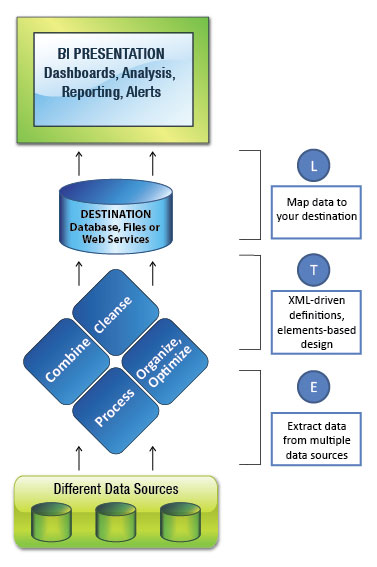 Listado de las principales herramientas de ETL para la empresa que ofrecen los fabricantes de software ETL.