Open Data at Barcelona Web Congress

At the Web Congress in Barcelona, ​​I attended a workshop on Open Data in wich Martín Alvarez Espinar, W3C Spanish Office's head, and Jordi Graells i Costa, coordinator of content and innovation of the Generalitat de Catalunya, explained what is the international initiative Open Data, and how it is developed in concrete projects in some communities of Spain, as Asturias and Catalonia.

RHIPE: Using Hadoop to analyze very large data with R

Hadoop is an Apache project that provides an environment that supports the management of large amounts of data. Such systems are typically used to support the large amount of information generated by great social networks, especially when relational databases are beginning to have problems of scalability, or the cost of growth is too high.

Oracle RAC One Node

In Oracle 11g release 2, Oracle introduced a new product Oracle Real Application Clusters One Node (Oracle RAC One Node)

This product is an Oracle RAC' s instance but executed in one single node. May be run on different physical servers, not only one (this is common) but a database instance is running only on the same node  simultaneously  (* but we'll see later that this is not completely true).


Four questions to identify a developer with no knowledge of database

I leave here this link to a page where a small test posed to do in job interviews for database developers. Here this kind of test I do not think the style is much in a job interview, but more than one entry into the development department should evaluate its knowledge with a similar test. More than anything to avoid cracks, maximum connections, table layouts if primary keys, etc...


CRM solutions for SMEs

The customer

I've found an interesting Discussion on CRM Experts Linkedin Group baout the search of CRM solutions for small businesses.

The debate has many responses and, apart from good advices, have come many proposals for CRM applications aimed at SMEs, so I've decided to create a list, that I hope to be useful..

LifeDashBoard 4 Team Prelytis SaaS solution, you can use without paying for their use.

Prelytis, the company recently surprised us by being the frist to adapt its Business Intelligence solution (or Dashboarding, more specifically) to Apple's iPad, also excels in the world of SaaS solutions with its proposal LifeDashBoard 4 Team, which is not is nothing but the cloud version of its software LifeDashBoard Dashboards.

It has the usual characteristics of SaaS software, and soon afte a user register and upload data from an Excel spreadsheet, for example, may have created an attractive dashboard. Collaborative options available, and also takes advantage of the features of mobile devices like the iPhone or IPAD.

But what makes this more special is that it's SaaS solution, but can be used without paying for its use, and without limitation in the number of users. A strong commitment by Prelytis, which seems to be really willing to put a dent in the world based BI innovative proposals.


How to disable autocommit option in SQL Server Management Studio

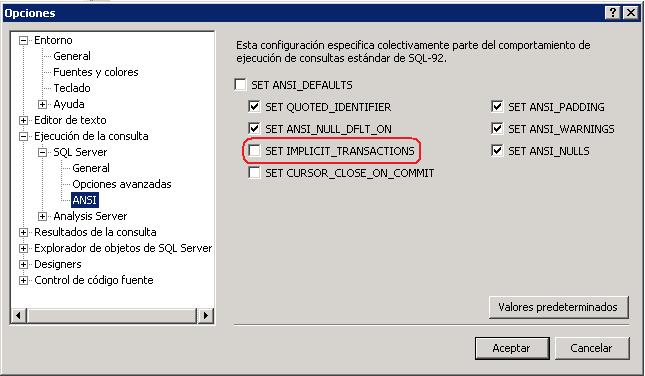
Have you ever wondered how to disable the autocommit option in Sql Server Management Studio?

The answer is quick. Simply uncheck the option SET IMPLICIT_TRASLATIONS. To do it follow next path from the menu:

Tools> Options> Execution of the query> SQL Server> ANSI, then Uncheck Option SET IMPLICIT_TRANSACTIONS.


It seems rather simple but is a common doubt when you start using SQL Server Management Studio. By sharing this tip I hope to save time to someone that wants to disable the autocommit option in SQL Management Studio.

[[ad]]

Pentaho 2.0: Virtual Image

From Grupo eGlu, Dario Bernabeu and Mariano García Mattío, we have created a virtual machine (vmware) that contains a fully functional BI solution.

It has the following characteristics:

  • Operating System: Ubuntu 8.10
  • BI Platform: Pentaho 2.0
  • DBMS: MySQL

This demo also has the following modules:

  • Pentaho Data Integration: Through this tool we have designed the transformations and jobs that extract, transform and load the data to populate the Data Warehouse. (Select option 'No catalog')
  • Mondrian Workbench: Through this tool we have created multidimensional schemes.
  • Pentaho Metadata Editor: Through this tool we've created the Business Model.
  • Design Studio: Through this tool we have developed the xactions.
  • Pentaho Report Design: Through this tool we have created an ad hoc report that requests input parameters.

These modules can be accessed through the taskbar side:

Improve MySQL performance by adjusting some parameters

MySQL, like most database managers, can easily modify the parameters that control memory sizes engaged in certain tasks, resource utilization, concurrency limits, etc.

Properly adjusting these parameters can be obtained many performance improvements, especially if the server / s of the database is not about resources, and if the SQL optimization can not be improved more.

I've recently made some basic settings in a MySQL database, so I take this opportunity to explain some of the process I followed for those who seek an easy way to make a first optimization of parameters in the database. This is not to say that this is the best way to do just that to me has worked out well;)

The first comment that can be very helpful to look in phpMyAdmin to the sections 'Show information about MySQL runtime' and 'Show MySQL system variables', normally accessible from the home page of the application.

The first displays information and statistics collected and maintained the system since its beginning. Pay special attention to the values of variables that are displayed in red, and the advice provided to the right of these values.

Please refer to the variables used to determine the current values of the parameters that could later be modified to improve performance.